
Mastering Clean Architecture in Flutter: The Ultimate Production-Grade Guide (Part 3)
Offline-First • Network Layer • Dio • Error Handling • Caching • Testing • Production Best Practices In Part 1, we explored the fundamentals of Clean ...
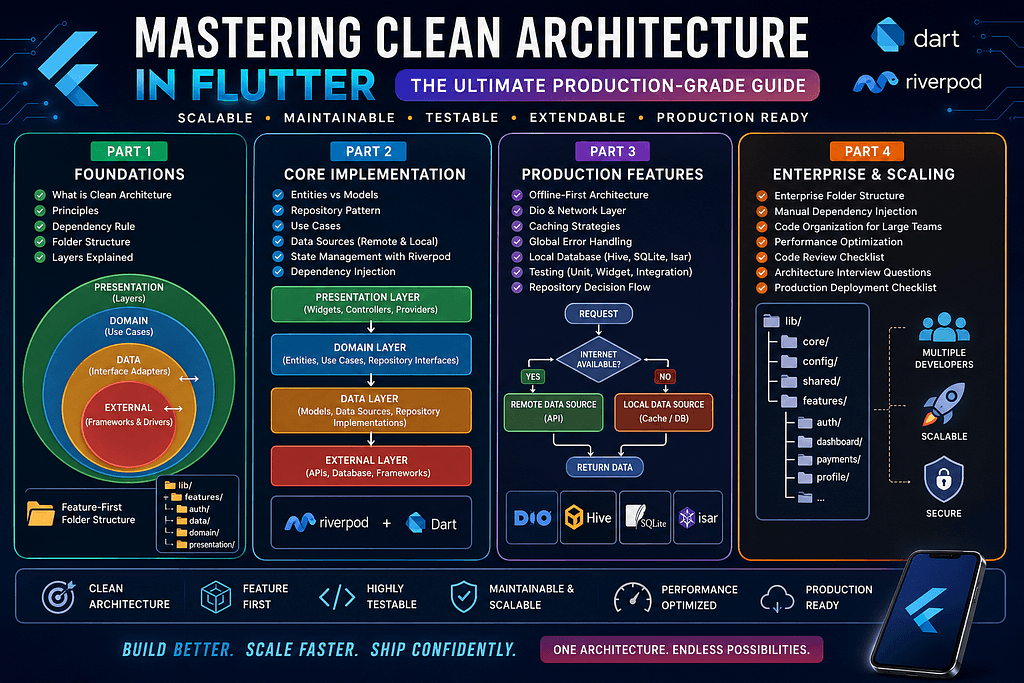
Offline-First • Network Layer • Dio • Error Handling • Caching • Testing • Production Best Practices In Part 1, we explored the fundamentals of Clean Architecture, the Dependency Rule, and feature-first project organization. In Part 2, we built the Domain and Data layers, understood the Repository Pattern, Entities, Models, DTOs, Use Cases, Riverpod integration, and Dependency Injection. Now we’ll take the architecture to the next level by implementing the practices used in real production applications. Topics covered: Offline-First Architecture Network Layer Dio Best Practices Global Error Handling Caching Strategies Testing Enterprise Best Practices What is Offline-First Architecture? One of the biggest mistakes developers make is assuming users always have an internet connection. Reality is different. Users may experience: Poor network Flight mode Underground metro Remote villages Slow WiFi Server downtime A professional application should continue working even when the internet isn’t available. Traditional Architecture User ↓ API ↓ Server ↓ Response No internet? Application breaks. Offline-First Architecture User ↓ Repository ↓ Cache Available? ↓ YES → Local Database ↓ NO ↓ Call API ↓ Save Cache ↓ Return Data This architecture keeps the application usable even when connectivity is poor. Choosing Local Storage Flutter offers several storage solutions. SharedPreferences Good for: Theme Token Settings Language Not suitable for large datasets. Hive Excellent for: Offline cache Small databases Fast reads Lightweight storage Pros ✅ Fast ✅ Simple ✅ No SQL SQLite Best for: Complex queries Relationships Reports Enterprise apps Example: Banking CRM ERP Inventory Isar A modern alternative. Advantages: Extremely fast No SQL Reactive queries Excellent Flutter integration Suitable for many new projects. Repository Decision Flow A professional repository follows this strategy: Repository ↓ Internet Available? ↓ YES ↓ Call API ↓ Success? ↓ Save Cache ↓ Return Data ↓ NO ↓ Read Local Cache ↓ Return Cached Data Notice something important. The UI never knows where the data came from. Network Layer The Network Layer should be completely independent. Its responsibilities: HTTP requests Authentication headers Logging Retry Timeout Response parsing Nothing else. Why Use Dio? Although Flutter provides the http package, most enterprise teams prefer Dio. Reasons: Interceptors Better error handling File upload Download progress Multipart requests Request cancellation Retry support Custom headers Typical Dio Flow Controller ↓ Use Case ↓ Repository ↓ Remote Data Source ↓ Dio Client ↓ REST API The controller never calls Dio directly. Using Interceptors Interceptors are one of Dio’s most powerful features. They allow you to intercept every request and response. Typical responsibilities: Attach JWT Token Refresh expired token Logging Retry failed requests Error transformation Instead of repeating this logic across the app, write it once. Authentication Flow Request ↓ JWT Exists? ↓ Yes ↓ Attach Token ↓ API ↓ 401 Unauthorized? ↓ Refresh Token ↓ Retry Request ↓ Return Response Everything happens automatically. The UI never notices. Global Error Handling A common beginner mistake: try { }catch(){ } inside every screen. Imagine doing this 300 times. Instead, centralize error handling. Enterprise Error Flow API ↓ Dio Exception ↓ Repository ↓ Failure ↓ Use Case ↓ Controller ↓ UI Only one layer knows about Dio. The Presentation Layer receives a clean Failure object. Types of Failures Instead of exposing HTTP errors, define meaningful failures. Examples: NetworkFailure ServerFailure CacheFailure AuthenticationFailure ValidationFailure TimeoutFailure UnknownFailure This keeps the UI independent of networking libraries. Caching Strategy Many enterprise applications use: Memory Cache ↓ Local Database ↓ REST API Order matters. Memory is fastest. Database is second. API is slowest. Always fetch from the fastest available source. Cache Expiration Don’t keep cached data forever. Example: Weather ↓ 10 Minutes News ↓ 30 Minutes Products ↓ 24 Hours Different features require different cache durations. Optimistic Updates Imagine updating your profile. Instead of waiting: Update Button ↓ API ↓ Wait... ↓ Success ↓ UI Use: Update Button ↓ Update UI ↓ Call API ↓ Success ↓ Done ↓ Failure ↓ Rollback The application feels significantly faster. Pagination Never load 10,000 records at once. Instead: Page 1 ↓ Scroll ↓ Page 2 ↓ Scroll ↓ Page 3 This reduces: Memory API load Startup time Lazy Loading Load only what the user needs. Good examples: Images Chat messages Product catalog News feed This improves perceived performance. Testing Clean Architecture One of the biggest advantages of Clean Architecture is testability. You can test every layer independently. Unit Testing Test: Use Cases Validators Calculations Repository Logic Fast. Reliable. Widget Testing Test: Buttons Forms Navigation UI State Without running the full application. In
Related Articles
Mastering Clean Architecture in Flutter: The Ultimate Production-Grade Guide (Part 4)
Enterprise Architecture • Performance • Scaling Teams • Best Practices • Interview Questions • Production Checklist Congratulations! If you’ve reached...
Mastering Clean Architecture in Flutter: The Ultimate Production-Grade Guide (Part 2)
In the first part of this guide, we explored the philosophy behind Clean Architecture, the Dependency Rule, the three core layers, and a production-re...