
Mastering Clean Architecture in Flutter: The Ultimate Production-Grade Guide (Part 2)
In the first part of this guide, we explored the philosophy behind Clean Architecture, the Dependency Rule, the three core layers, and a production-re...
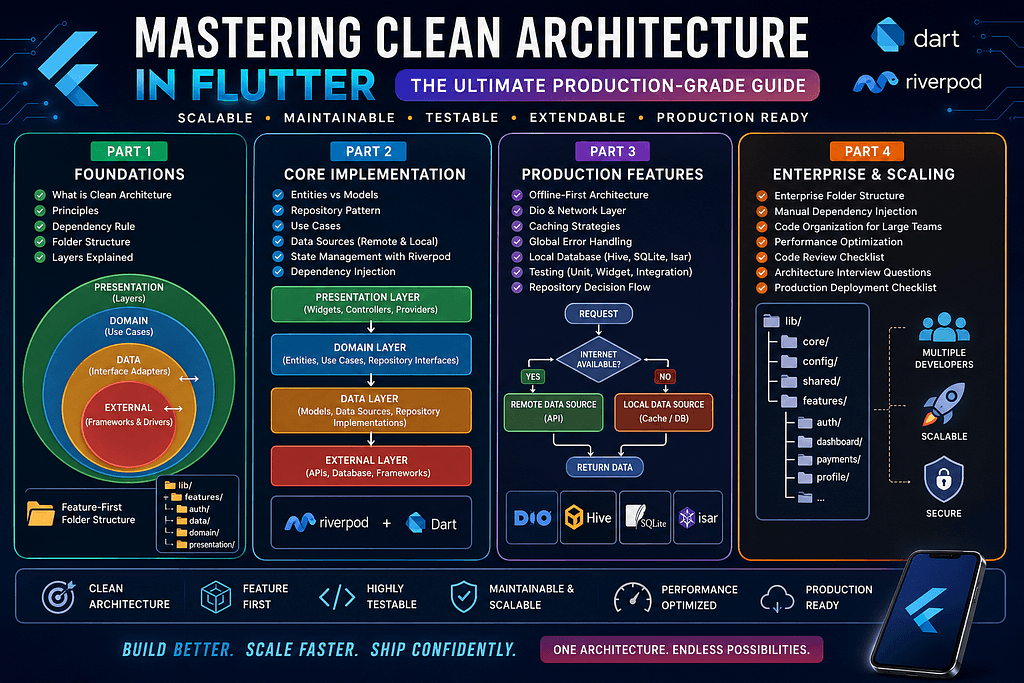
In the first part of this guide, we explored the philosophy behind Clean Architecture, the Dependency Rule, the three core layers, and a production-ready folder structure. Now it’s time to implement the architecture. We’ll dive into: The Data Layer The Domain Layer Repository Pattern Entities vs Models vs DTOs Use Cases Riverpod Integration (without code generation) Manual Dependency Injection Complete API Flow By the end of this section, you’ll understand how enterprise Flutter applications separate responsibilities while remaining easy to maintain. Understanding the Domain Layer If Clean Architecture had a heart, it would be the Domain Layer. Everything else exists to support it. The Domain Layer contains your application’s business rules. It defines what the application does, not how it does it. Think about an e-commerce application. Business rules include: Login User Register User Add Product to Cart Remove Product Calculate Discount Create Order Process Payment Notice that none of these mention: Flutter Firebase HTTP SQLite JSON Riverpod Business logic should remain independent of technology. Components of the Domain Layer A production-ready Domain Layer usually contains three parts: domain/ ├── entities/├── repositories/└── usecases/ Each has a specific responsibility. Entities Entities represent your business objects. For example: User Product Order Invoice Customer An Entity should contain only the data and business rules that define that concept. For example, a User Entity might contain: id name email phone Notice what’s missing: ❌ JSON parsing ❌ API logic ❌ Database annotations ❌ Firebase references Entities should remain clean and independent. Why Entities Matter Suppose your backend changes. Yesterday the API returned: username Today it returns: full_name If your UI depends directly on API models, dozens of screens might break. Instead: API Model ↓ Entity ↓ UI Only the mapping changes. The rest of your application continues working. Repository Interfaces One of the most misunderstood concepts is the Repository Pattern. A repository is not your API. It is not your database. Instead, it is an abstraction that hides where the data comes from. For example: AuthenticationRepository ↓ login() logout() refreshToken() getCurrentUser() The UI doesn’t know whether the data comes from: Firebase REST API SQLite Hive Local Cache It simply asks the repository. Why Use Repository Interfaces? Imagine your authentication currently uses Firebase. Later your company migrates to Auth0. Without repositories: Login Screen ↓ Firebase SDK Every screen must change. With repositories: Login Screen ↓ Authentication Repository ↓ Firebase Later: Login Screen ↓ Authentication Repository ↓ Auth0 The Presentation Layer never changes. That’s the power of abstraction. Understanding Use Cases Many developers skip Use Cases. That works initially — but becomes painful in larger projects. A Use Case represents one business action. Examples: LoginUser RegisterUser UpdateProfile DeleteAccount FetchDashboard UploadDocument Notice the naming. Each Use Case performs exactly one job. Why One Use Case Per Action? Imagine combining everything into a single controller. Eventually it grows to: 2,000 lines 25 methods API logic Validation Navigation Analytics Instead: Login ↓ LoginUseCase Another action: Reset Password ↓ ResetPasswordUseCase Small classes are easier to understand, test, and maintain. The Data Layer The Data Layer is responsible for obtaining data. It communicates with: REST APIs GraphQL Firebase SQLite Hive SharedPreferences Local Cache Unlike the Domain Layer, this layer understands implementation details. Structure of the Data Layer data/ ├── datasource/├── models/├── repositories/└── mapper/ Each directory has a dedicated responsibility. Data Sources A Data Source is responsible for communicating with a specific data provider. Examples: Remote Data Source ↓ REST API or Local Data Source ↓ SQLite Keeping them separate allows you to switch implementations independently. Remote Data Source Responsibilities include: HTTP requests Headers Tokens Response parsing Error handling File upload Nothing else. It should never contain UI logic. Local Data Source Responsibilities include: Reading cache Saving cache Deleting cache Updating records Local queries Again: No business logic. Models Models represent raw data received from APIs or databases. Unlike Entities, Models understand serialization. Responsibilities include: JSON parsing Serialization API fields Database mapping Models should never be used directly inside your UI. Entity vs Model One of the most common interview questions. Think of it this way: Entity ↓ Business Object Model ↓ API Object For example: API returns: full_name Your Entity contains: name The UI never cares about API field names. DTO (Data Transfer Object) Some enterprise projects introduce DTOs. Flow: Server ↓ DTO ↓ Model ↓ Entity ↓ Presentation DTOs are especially useful when multiple A
Related Articles
Mastering Clean Architecture in Flutter: The Ultimate Production-Grade Guide (Part 4)
Enterprise Architecture • Performance • Scaling Teams • Best Practices • Interview Questions • Production Checklist Congratulations! If you’ve reached...
Mastering Clean Architecture in Flutter: The Ultimate Production-Grade Guide (Part 3)
Offline-First • Network Layer • Dio • Error Handling • Caching • Testing • Production Best Practices In Part 1, we explored the fundamentals of Clean ...