
Mastering Clean Architecture in Flutter: The Ultimate Production-Grade Guide (Part 1)
Flutter Clean Architecture: The Ultimate Production Guide (2026) Learn Flutter Clean Architecture from scratch with production-ready folder structures...
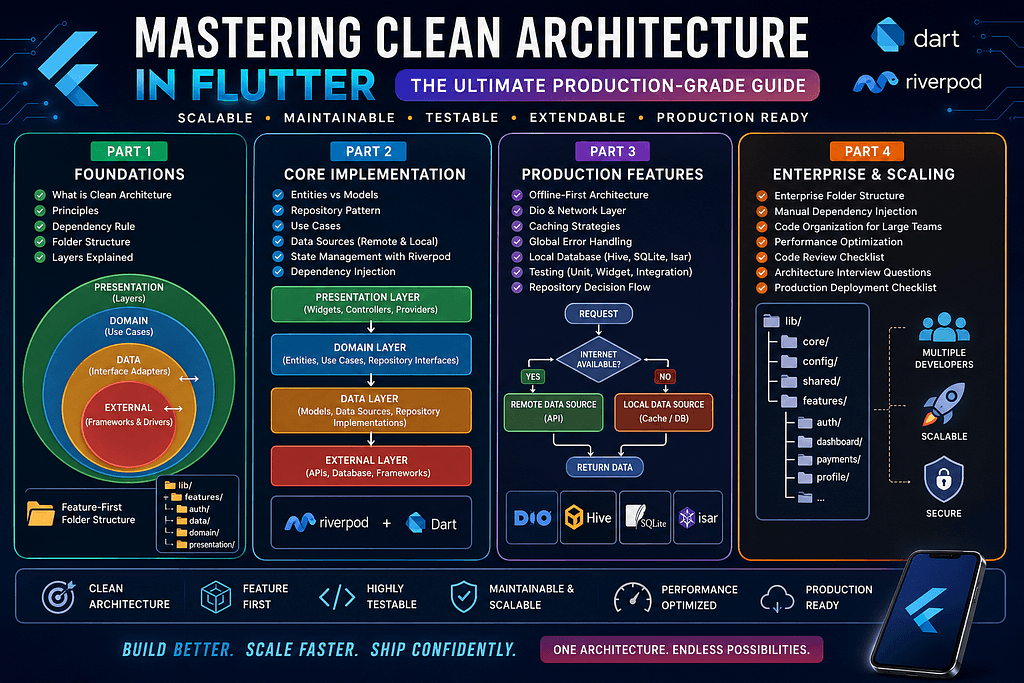
Flutter Clean Architecture: The Ultimate Production Guide (2026) Learn Flutter Clean Architecture from scratch with production-ready folder structures, dependency rules, feature-based architecture, Riverpod integration, and enterprise best practices. Mastering Clean Architecture in Flutter: The Ultimate Production-Grade Guide 🚀 “Every Flutter developer can build an app. Great Flutter developers build apps that can still be maintained five years later.” As Flutter applications grow, so does their complexity. A simple app that starts with a few screens can quickly evolve into a large-scale product with authentication, APIs, local databases, notifications, offline support, payments, analytics, and dozens of features. Many developers begin by placing everything inside the lib folder: lib/├── screens/├── widgets/├── models/├── services/└── main.dart At first, this feels manageable. But after six months, the project becomes difficult to maintain: Business logic is mixed with UI. API calls are scattered across widgets. Code duplication increases. Testing becomes painful. Adding new developers becomes difficult. Every feature introduces more technical debt. Sound familiar? This is exactly the problem Clean Architecture was designed to solve. Clean Architecture helps you build Flutter applications that are scalable, maintainable, testable, and easy to extend. It provides a clear separation of responsibilities, allowing each layer of your application to focus on a single purpose. In this guide, you’ll learn how to implement production-ready Clean Architecture in Flutter using modern best practices, a feature-first structure, Riverpod for state management, and manual dependency injection. Whether you’re building your first Flutter app or managing an enterprise-scale product, these concepts will help you write cleaner code and reduce long-term maintenance costs. What is Clean Architecture? Clean Architecture is a software design philosophy introduced by Robert C. Martin (Uncle Bob). Its primary goal is to separate an application into independent layers so that changes in one part of the system have minimal impact on others. Instead of tightly coupling your UI, business logic, and data sources, Clean Architecture organizes them into well-defined layers with clear responsibilities. This separation makes the application: Easier to understand Easier to test Easier to maintain Easier to scale Less dependent on frameworks or external services One of the biggest advantages is that your business logic remains independent of Flutter itself. If you ever decide to change your UI framework or data source, your core business rules remain intact. Why Traditional Flutter Projects Become Difficult to Maintain Consider a typical beginner project: LoginScreen │ ├── HTTP Request ├── Parse JSON ├── Save Token ├── Show Snackbar └── Navigate Home Everything happens inside a single widget. While this works for small demos, problems appear as the project grows. Common Issues ❌ UI directly calls APIs ❌ Widgets contain business logic ❌ Database logic is mixed with presentation ❌ Authentication is duplicated ❌ Testing requires launching the UI ❌ Replacing an API becomes difficult ❌ Every feature depends on every other feature Eventually, even small changes become risky. The Goal of Clean Architecture Clean Architecture aims to answer one simple question: “Where should this piece of code live?” Every class should have a single responsibility. For example: Login Button ↓ Login Controller ↓ Login Use Case ↓ Repository ↓ Remote API ↓ Server Each layer performs exactly one job. Core Principles of Clean Architecture Clean Architecture is based on several important principles. 1. Separation of Concerns Every layer should focus on one responsibility. Presentation handles the UI. Domain contains business rules. Data communicates with APIs and databases. This separation makes the application easier to understand and modify. 2. Single Responsibility Principle Every class should have only one reason to change. For example: A repository should retrieve data. A widget should display data. A use case should execute business logic. When classes become too large, maintenance becomes more difficult. 3. Dependency Inversion High-level modules should not depend on low-level modules. Instead, both should depend on abstractions. This principle keeps your business logic independent of implementation details. 4. Testability Business logic should be testable without Flutter. You should be able to test: Login Payments Validation Calculations without launching an emulator. 5. Scalability Adding new features should not require modifying existing features. Instead, each feature should remain isolated. 6. Independence Your application should not depend directly on: Flutter Firebase REST APIs SQLite Hive These are implementation details — not business rules. Uncle Bob’s Clean Architecture Diagram The architecture is often represented as
Related Articles
Mastering Clean Architecture in Flutter: The Ultimate Production-Grade Guide (Part 4)
Enterprise Architecture • Performance • Scaling Teams • Best Practices • Interview Questions • Production Checklist Congratulations! If you’ve reached...
Mastering Clean Architecture in Flutter: The Ultimate Production-Grade Guide (Part 3)
Offline-First • Network Layer • Dio • Error Handling • Caching • Testing • Production Best Practices In Part 1, we explored the fundamentals of Clean ...