
Implementing In-App Purchases & Subscription Models in Flutter: The Complete Production Guide
Flutter In-App Purchases Tutorial | Subscriptions, Play Billing & App Store Guide (2026) Learn how to implement In-App Purchases (IAP) and subscri...
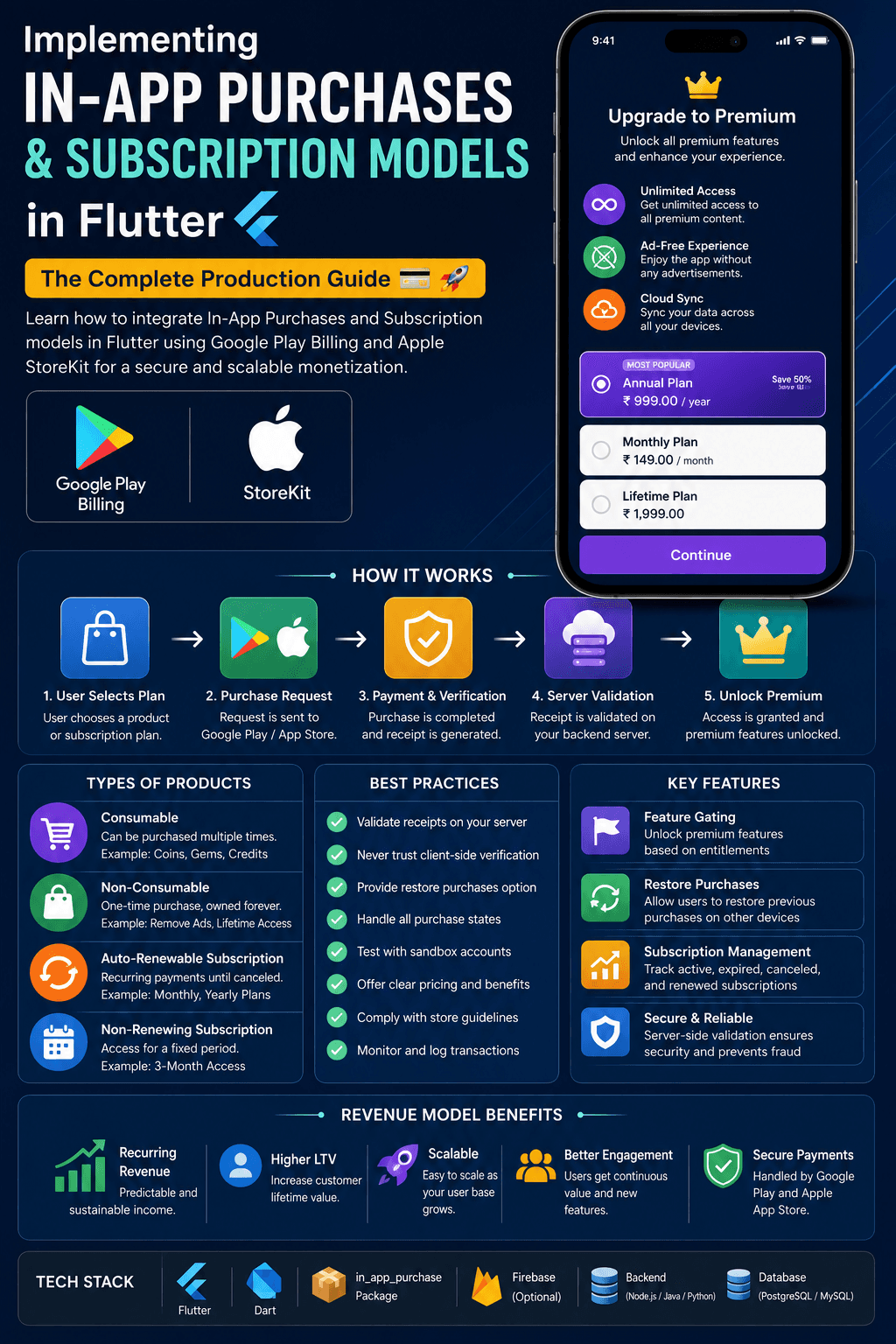
Flutter In-App Purchases Tutorial | Subscriptions, Play Billing & App Store Guide (2026) Learn how to implement In-App Purchases (IAP) and subscription models in Flutter using Google Play Billing and Apple StoreKit. Covers consumables, non-consumables, subscriptions, server validation, restoration, best practices, and production-ready architecture. Implementing In-App Purchases & Subscription Models in Flutter: A Complete Guide 💳 Imagine you’ve built an amazing Flutter application. Your users love it. Downloads are increasing every day. Now comes the important question: How do you monetize your app? One of the most popular and sustainable ways is through In-App Purchases (IAP) and Subscription Models. From Netflix and Spotify to YouTube Premium, Notion AI, and Duolingo, millions of apps generate recurring revenue by offering premium features, subscriptions, or one-time purchases. In this guide, you’ll learn everything you need to know about implementing In-App Purchases in Flutter, including the architecture, purchase flow, subscriptions, receipt validation, common pitfalls, and production best practices. What Are In-App Purchases? An In-App Purchase (IAP) allows users to buy digital products or services directly within your application. Examples include: Premium Features Extra Storage Coins & Gems Ad-Free Experience Pro Version Digital Books Courses Monthly Memberships Annual Plans Google Play and the Apple App Store securely process these payments and deliver purchase information back to your app. Types of In-App Purchases Understanding the available purchase types is essential before implementation. 1. Consumable Products Consumable purchases can be bought multiple times. Examples: Game Coins Energy Packs Extra Lives Tokens Credits Once consumed, they can be purchased again. 2. Non-Consumable Products These are purchased only once. Examples: Remove Ads Unlock Premium Theme Lifetime Premium Advanced Features Pro Upgrade Users can restore these purchases on another device using the same store account. 3. Auto-Renewable Subscriptions Subscriptions renew automatically until canceled. Examples: Netflix Spotify YouTube Premium Cloud Storage Premium Membership These provide recurring revenue and are one of the most popular monetization models. 4. Non-Renewing Subscriptions These provide access for a fixed duration but do not renew automatically. Examples: Three-month course access Seasonal membership Event passes Renewal must be handled manually. Why Choose Subscriptions? Subscriptions offer several benefits: Predictable recurring revenue Higher customer lifetime value Continuous feature delivery Easier pricing experiments Long-term customer relationships For SaaS and productivity apps, subscriptions are often more sustainable than one-time purchases. Flutter In-App Purchase Architecture A production-ready implementation typically follows this flow: Flutter App ↓ User Selects Plan ↓ Google Play Billing / Apple StoreKit ↓ Purchase Verification ↓ Backend Server ↓ Database ↓ Unlock Premium Features The backend plays a critical role in validating purchases and managing entitlements securely. Supported Platforms Flutter supports: Android (Google Play Billing) iOS (Apple StoreKit) For web and desktop, payment providers such as Stripe, Paddle, or PayPal are commonly used instead. Add the Required Package The official Flutter plugin is: dependencies: in_app_purchase: latest Install dependencies: flutter pub get The official plugin provides a unified API across Android and iOS. Creating Products Products are configured in: Google Play Console Create products such as: monthly_premium yearly_premium remove_ads lifetime_pro App Store Connect Create matching product identifiers for iOS. Keeping identifiers consistent across platforms simplifies development. Purchase Flow A typical purchase journey looks like this: User Taps Buy ↓ Fetch Product Details ↓ Show Store Purchase Dialog ↓ User Completes Payment ↓ Store Returns Receipt ↓ Backend Validates Receipt ↓ Unlock Premium Content This ensures purchases are securely verified before granting access. Restore Purchases Users often switch devices or reinstall the app. Your application should provide a Restore Purchases option for non-consumables and subscriptions. This improves user experience and complies with platform guidelines. Receipt Validation One of the most important production practices is validating purchase receipts on your backend. Avoid unlocking premium features based solely on the app’s local purchase result. Server-side validation helps prevent: Fake purchases Tampered receipts Modified APKs Unauthorized premium access Always trust your backend — not the client. Subscription Management A subscription has multiple states. Examples include: Active Trial Grace Period Paused Renewed Expired Canceled Refunded Your backend should synchronize these states to ensure users receive the correct level of access. Free Trials Offering a free
Related Articles
Mastering Clean Architecture in Flutter: The Ultimate Production-Grade Guide (Part 4)
Enterprise Architecture • Performance • Scaling Teams • Best Practices • Interview Questions • Production Checklist Congratulations! If you’ve reached...
Mastering Clean Architecture in Flutter: The Ultimate Production-Grade Guide (Part 3)
Offline-First • Network Layer • Dio • Error Handling • Caching • Testing • Production Best Practices In Part 1, we explored the fundamentals of Clean ...