
Flutter Flavors: The Complete Production Guide to Managing 15+ Apps from a Single Codebase
Flutter Flavors Complete Guide (2026) | Manage Multiple Apps with One Codebase Learn everything about Flutter Flavors, including setup, benefits, best...
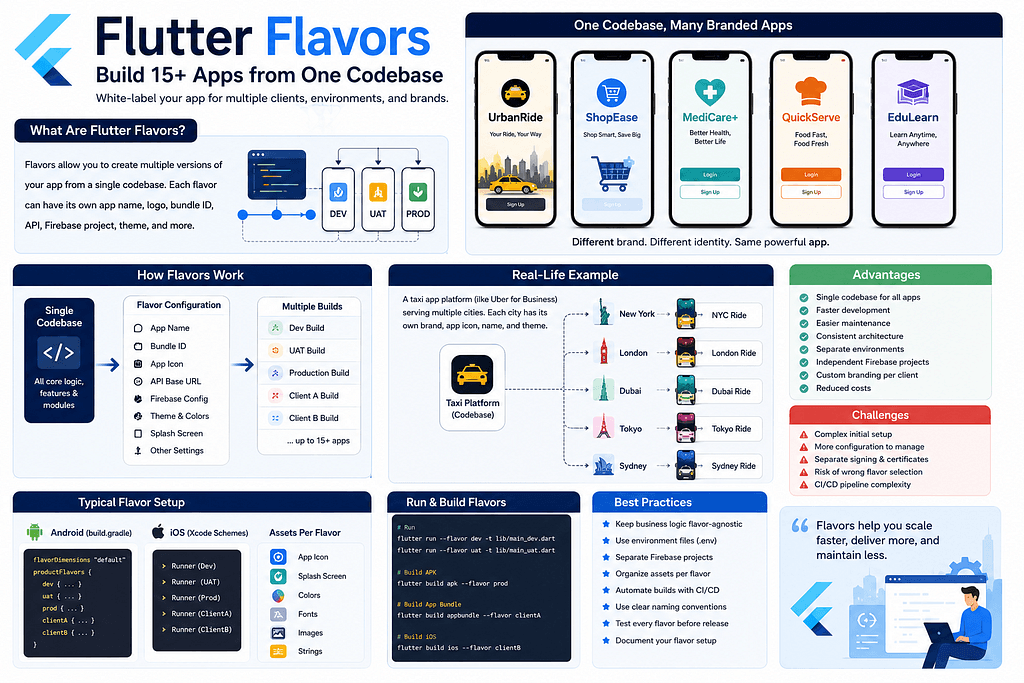
Flutter Flavors Complete Guide (2026) | Manage Multiple Apps with One Codebase Learn everything about Flutter Flavors, including setup, benefits, best practices, environment management, Firebase integration, CI/CD, and how to manage 15+ Flutter applications from a single codebase. Flutter Flavors: The Ultimate Guide to Managing Multiple Apps from a Single Codebase 🚀 As Flutter applications grow, many development teams eventually face a common challenge: How do we maintain multiple apps for different clients without duplicating the entire project? Imagine you build applications for multiple businesses. Instead of maintaining: 15 different Flutter projects 15 Firebase projects …you can maintain one Flutter project and generate all 15 applications using Flutter Flavors. This is exactly how many enterprise companies, SaaS providers, and agencies manage dozens of applications while keeping maintenance costs low. In this guide, you’ll learn everything about Flutter Flavors — from basic concepts to enterprise-level architecture used in production. What are Flutter Flavors? Flutter Flavors allow you to create multiple versions of the same application from a single codebase. Each flavor can have its own: App Name Package Name Bundle Identifier Logo Splash Screen API URL Firebase Project Theme Icons Features Environment Variables Build Configuration Although every app shares the same business logic, each behaves like an independent application. Real-World Example Suppose your company develops mobile applications for different Spritual providers. Instead of creating separate projects: VedaShakti AppGranth AppAstroPro AppAstroWay App You maintain one project: astro_pro/ Then create flavors such as: devuatprod VedaShakti GranthAstroProAstroWay The result: One codebase. Multiple branded applications. Minimal maintenance. Why Use Flavors? Flavors solve several real-world development problems. Without Flavors Imagine maintaining 15 independent projects. Whenever you fix a login bug, you must: Open Project 1 Fix Commit Repeat 15 times. The same applies to: Payments Notifications Security fixes Analytics Performance improvements Maintenance becomes extremely expensive. With Flavors Fix the issue once. Every flavor automatically benefits. That’s the biggest advantage of Flutter Flavors. Types of Flavors Most companies separate flavors by environment. Development Purpose: Local development Testing new features Experimental builds Example: flutter run --flavor dev UAT (User Acceptance Testing) Purpose: QA Testing Client Verification Pre-production testing Example: flutter run --flavor uat Production Purpose: Published application. Connected to: Production API Production Firebase Production Analytics Client-Based Flavors Many organizations also create client flavors. Example: AstroPro VedaShakti AstroWay AstroLife VedaShiv Corporate Enterprise Demo Every client receives: Different logo Different API Different colors Different Firebase Same Flutter code. Typical Enterprise Folder Structure lib/ core/ config/ environments/ main/ main_dev.dart main_uat.dart main_prod.dart features/ shared/ assets/ flavors/ A clean architecture keeps flavor-specific configuration separate from business logic. What Changes Per Flavor? Each flavor can override: App Name Example: VedaShakti App DEV VedaShakti App UAT VedaShakti App Package Name Android com.company.app.dev com.company.app.uat com.company.app Bundle Identifier iOS com.company.app.dev com.company.app.uat com.company.app Different Logos Development Blue icon UAT Orange icon Production Official logo This helps developers immediately recognize which build they’re using. API URLs Development https://dev-api.company.com UAT https://uat-api.company.com Production https://api.company.com No manual URL changes are required. Firebase Projects Each flavor should have its own Firebase project. Example: firebase-dev firebase-uat firebase-prod Benefits: Separate Analytics Separate Crashlytics Separate Notifications Separate Remote Config Environment Variables Instead of hardcoding values, use environment files. Example: .env.dev .env.uat .env.prod Store values such as: API Base URL Maps API Key Payment Keys Feature Flags This keeps secrets organized and environment-specific. Running Flavors Examples: Development flutter run --flavor dev -t lib/main/main_dev.dart UAT flutter run --flavor uat -t lib/main/main_uat.dart Production flutter run --flavor prod -t lib/main/main_prod.dart Building APKs Development flutter build apk --flavor dev UAT flutter build apk --flavor uat Production flutter build apk --flavor prod Building App Bundles flutter build appbundle --flavor prod Building iOS flutter build ios --flavor prod Managing 15+ Applications Using Flavors Many developers think Flutter Flavors are only for Dev, QA, and Production. In reality, large organizations often use flavors to support multiple clients. Imagine this structure: Client AClient BClient C...Client O All share: Authentic
Related Articles
Mastering Clean Architecture in Flutter: The Ultimate Production-Grade Guide (Part 4)
Enterprise Architecture • Performance • Scaling Teams • Best Practices • Interview Questions • Production Checklist Congratulations! If you’ve reached...
Mastering Clean Architecture in Flutter: The Ultimate Production-Grade Guide (Part 3)
Offline-First • Network Layer • Dio • Error Handling • Caching • Testing • Production Best Practices In Part 1, we explored the fundamentals of Clean ...